
A television that disappears into your décor sounds ideal—until you realize the experience depends as much on the art service as the screen. The Samsung Art Store is designed to turn a compatible television into a rotating digital gallery, giving you access to museum works, photography, contemporary pieces, and personal images when you aren’t watching shows.
For U.S. homeowners, apartment dwellers, interior designers, and art-loving TV buyers, the real questions are practical. What do you get for the fee? Can you use your own images? Does the display look convincing in daylight? And is a subscription worthwhile once the novelty wears off?
This guide explains the service as it operates in 2026, including free options, paid access, compatible televisions, setup, picture adjustments, ownership limits, and buying considerations. It also clears up confusing searches such as 18/21, which isn’t a screen format or Samsung model number.
What the Samsung Art Store Actually Is
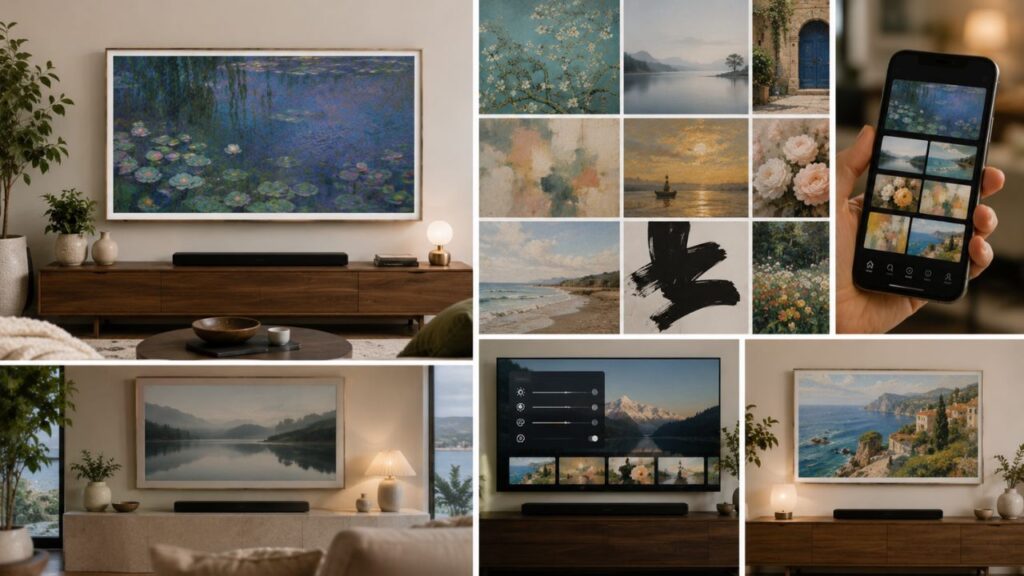
The service is a digital art platform built into supported Samsung televisions. Instead of leaving a blank black rectangle on the wall, you can display licensed paintings, photographs, illustrations, and curated collections through an Art interface.
Samsung announced in June 2026 that its global catalog had grown beyond 5,000 works in 4K from more than 800 artists and over 80 partners. Availability can differ by country, television model, and licensing period, so the number and selection you see on your screen may not match another owner’s library exactly.
The platform has partnerships and collections connected with museums, galleries, artists, and major art events. Recent Samsung materials have highlighted institutions and organizations such as The Metropolitan Museum of Art, MoMA, the Art Institute of Chicago, Tate, and Art Basel, although individual works can rotate or leave the catalog.
Art Mode Is the Display Experience
Art Mode is the television setting that shows artwork when you’re not using the screen for regular entertainment. The store supplies licensed content, while Art Mode controls how that content appears, including brightness, color tone, mat presentation, sleep timing, and other settings that vary by model.
This distinction helps when comparing frame tv art options. The phrase can refer to subscription artwork, free streamed selections, personal photos, or third-party digital files, but they don’t all come with the same rights, display tools, or convenience.
The Frame Is Still the Most Art-Focused Model
The samsung art frame tv idea is most closely associated with The Frame and The Frame Pro because those products are designed to resemble wall art. Matte-style screens, slim mounting, customizable bezels on eligible models, and Art Mode settings work together to make the screen less television-like.
However, the service is no longer limited to one lifestyle line. Select newer QLED, Neo QLED, OLED, and other supported Samsung models may offer access, although their mounting, glare control, sensors, and décor-focused design can differ from The Frame.
Samsung Art Store Subscription Options and Pricing
A samsung art store subscription gives you broad access to the current catalog instead of limiting you to free rotating selections or your own uploads. Samsung’s U.S. site currently lists monthly access at $4.99, and the television interface may also present an annual plan.
Pricing, taxes, promotions, annual availability, and currency can vary by location. Samsung’s terms also note that prices may change, so the amount shown in the Membership screen at checkout should be treated as the final current price for your account.
What Paid Membership Includes
Membership is intended to provide access to current and future works available within the service while your plan remains active. You can browse collections, save favorites, and change the display without purchasing each selection separately.
A samsung art store subscription is closer to streaming than buying a digital print. You’re paying for access to a changing licensed catalog, not permanent ownership of every artwork you display.
Monthly Versus Annual Plans
The monthly option is useful when you want to test the service through a decorating season, temporary home, or short-term design project. An annual plan may offer better value for a household that changes art frequently, but you should compare the exact checkout prices rather than relying on an old article or promotional screenshot.
A samsung art store subscription may also be bundled with qualifying television promotions. Read the redemption dates carefully, register the television promptly, and note whether the offer requires a payment card that will be charged after the free period ends.
Free Art Store Streams
Samsung currently offers Art Store Streams on supported models, with approximately 30 curated artworks refreshed each month. That provides a way to sample the gallery experience without paying for the full library, though you generally have less choice over what remains available.
For someone who enjoys occasional change but doesn’t care about selecting a particular artist, the free stream may be enough. For someone building a coordinated room palette or following specific museums, the paid catalog is more useful.
Frame TV Art Quality, Color, and Realism
The quality of frame tv art depends on more than resolution. Screen finish, room lighting, wall color, brightness, viewing angle, image crop, and the chosen mat all affect whether the display resembles a print or looks like a glowing television.
A common setup mistake is leaving the screen too bright. Real paper and canvas reflect room light; they don’t emit the same intensity as a movie scene. Lowering Art Mode brightness until white areas resemble nearby paper usually makes the illusion more convincing.
Adjust Brightness for the Room
Samsung’s current support guidance allows brightness and color-tone adjustments in Art Mode. Set the image in the lighting you use most often, then check it again after sunset because a convincing daytime level can look harsh in a dim room.
Owners searching samsung art tv settings often focus on sharpness, but brightness is usually the first adjustment that improves realism. Color tone comes next, especially in rooms with warm lamps or cool daylight.
Use Mats With Intention
A digital mat can create breathing space between the image and bezel, similar to a framed work on paper. It’s particularly helpful for portraits, sketches, and vertical works that would otherwise be awkwardly enlarged or cropped.
Not every artwork or television generation offers the same mat controls. When planning frame tv art, test the exact content and model rather than assuming every catalog piece can use every border style shown in advertising.
Glare and Placement Still Matter
A matte screen reduces reflections, but it can’t correct poor placement. A bright window directly opposite the television can wash out darker art, while a ceiling fixture reflected near the center makes the display look electronic.
The best samsung art tv placement is usually perpendicular to major windows, near eye level for the room’s primary seating or standing view, and away from intense spotlights. Think like a gallery installer, not just a TV installer.
What 18/21 Means in Current Samsung Art Searches
The search fragment 18/21 has appeared around current Samsung art coverage because Art Basel in Basel 2026 is open to the public from June 18–21 in Switzerland. It isn’t a television size, aspect ratio, resolution, software version, or subscription tier.
That distinction matters because short social captions and search snippets often remove the month and punctuation. Someone may see the numbers next to Samsung, Art Basel, or a digital collection and assume they identify a product feature.
It Refers to Event Dates, Not a Display Specification
In this context, the shorthand is derived from the June 18–21 event window. Samsung launched a related 24-work Art Basel in Basel 2026 collection featuring Swiss and Switzerland-based artists from eight participating galleries.
If a seller uses 18/21 in a product listing, ask what it means rather than treating it as official technical language. Samsung television specifications normally use clear measurements such as screen inches, model years, refresh rates, and model codes.
Why the Phrase Appears Beside Art TV Content
Social posts promoting the event often place the public opening dates near images of Samsung displays. As those captions are indexed or copied, the date range can appear beside phrases such as art tv samsung, even though the two are not a combined model name.
The safest approach is to read the full sentence or open the source. When that fragment appears in Art Basel coverage, it points to dates; elsewhere, the surrounding context should decide its meaning.
Using Personal Photos and Purchased Digital Art
You don’t need a paid membership to display every personal image. On compatible Frame models, Samsung supports adding photos through the SmartThings app, and some models also allow importing images from USB storage.
This option works well for family photography, travel images, commissioned illustrations, and digital art you have permission to display. It can also make frame tv art more personal than a large subscription library.
Upload Through SmartThings
Samsung’s current U.S. instructions direct users to open the television in SmartThings, enter Art Mode, choose Add Your Photos, and save selected images to The Frame. The exact menu wording can shift with app or firmware updates, but the television and phone generally need to be connected to the same Samsung ecosystem.
Before uploading, crop the image to suit a wide television canvas. A high-resolution landscape file tends to require less aggressive enlargement than a small social-media image.
USB Import Can Be Useful
USB import is convenient for large batches or files prepared on a computer. On models that support the method, connect storage to the appropriate box or port, enter the art collection area, and save the selected files.
People searching art tv samsung upload instructions sometimes confuse personal storage with cloud ownership. Keep your original files backed up elsewhere because the television shouldn’t be your only archive.
Respect Copyright and Licensing
Buying a physical print doesn’t automatically grant permission to reproduce its image digitally. Likewise, downloading an image from a museum website or social platform doesn’t necessarily permit full-screen household display through a separate device.
Use personal work, public-domain material, or files sold with suitable display rights. The paid store handles licensing within its own platform, which is one reason the subscription is more convenient than building a library from uncertain online sources.
Which Samsung Art TV Should You Buy?
Choosing a samsung art frame tv should begin with the room, not the catalog. Measure viewing distance, wall width, furniture height, sunlight, cable route, and the location of power and connection hardware before selecting screen size.
The Frame remains the obvious choice when the primary goal is a convincing art-like wall display. The Frame Pro adds higher-end display and connection features, while select conventional Samsung televisions may provide Art Store access without the same décor-first construction.
The Frame Versus The Frame Pro
The standard line can be the better value when you want a flush-looking installation, matte presentation, and regular 4K television use. The Pro line is aimed at buyers who also prioritize more advanced picture performance and a more flexible connection arrangement.
When comparing a samsung art frame tv, don’t focus only on the panel. Check what comes in the box, mounting requirements, bezel pricing, external connection hardware, wall construction, and whether professional installation is needed.
Selected QLED and Other Compatible TVs
Samsung expanded access to select 2025 QLED models and has continued broadening availability across newer premium television lines. Still, access to the store doesn’t make every model visually equivalent to The Frame.
A conventional samsung art tv may show the same licensed image but sit farther from the wall, reflect more room light, or expose more cables. Those differences matter when the television is supposed to pass as artwork from across the room.
Verify the Exact Model Number
Retail pages sometimes combine several sizes, years, or variants under one listing. Confirm the complete model code and open Samsung’s support page or manual before buying.
Search wording such as art tv samsung is too broad to establish compatibility. The exact model year and regional model number determine which interface, sensors, display finish, and art features you receive.
Styling a Samsung Art Frame TV Like Real Wall Art
A successful installation balances television ergonomics with interior design. The center of the screen should relate to nearby frames, furniture, and sightlines instead of automatically following the highest mounting position an installer finds convenient.
Choose Art by Scale, Not Just Color
Large, bold abstract works often read well from across an open-plan room. Detailed drawings, portraits, and photography benefit from closer viewing or a generous digital mat.
Rotate frame tv art with the seasons, but keep a few dependable pieces that suit the room year-round. Constant random changes can make the wall feel like signage rather than a considered collection.
Coordinate the Bezel and Wall
A light bezel can blend into pale plaster, while black creates a sharper contemporary edge. Wood-look or warm neutral options can connect the screen with flooring, shelves, or furniture.
The samsung art frame tv works best when the bezel belongs to the room’s material palette. Treat it like a frame choice, not a gadget accessory.
Build a Gallery Wall Carefully
A television can anchor a group of smaller works, but leave enough space for ventilation, mounting access, and visual separation. Use paper templates before drilling so the arrangement doesn’t crowd the screen.
For a balanced samsung art tv wall, repeat one or two colors from the displayed piece in nearby physical art. Avoid matching everything exactly; subtle relationships look more collected and less staged.
Account, Privacy, Energy, and Ownership Considerations
Network-based Art Store features require an internet connection and Samsung Account. Samsung’s current membership guidance also requires acceptance of relevant terms, which can include provisions about viewing history, advertising services, and personalized recommendations.
Read those terms before subscribing, particularly if multiple household members use the television. A samsung art store subscription is linked to the service account and supported device environment, not delivered as downloadable ownership files.
You’re Licensing Access
Artwork availability can change. If a favorite piece leaves the service, your subscription doesn’t guarantee permanent access to it.
This is an important distinction for buyers comparing the platform with purchased digital downloads. Art tv samsung content inside the store remains part of a licensed service, while your properly licensed personal files are managed separately.
Art Mode Still Uses Electricity
Art Mode is designed to display imagery rather than turn the screen completely off. Actual power use depends on screen size, brightness, model, room conditions, sensors, and how many hours the mode remains active.
Use Sleep After and Night Mode where appropriate, and check how your particular model behaves. Samsung’s current support pages describe Night Mode as responding to surrounding light and Sleep After as turning the display off after a selected period without detected motion.
Sensor Behavior Needs Testing
Motion and light detection can be affected by room layout, darkness, furniture placement, pets, and software behavior. Spend a few days adjusting the settings instead of assuming one default will suit every home.
A well-tuned samsung art frame tv should support the room rather than glowing all night or turning off whenever you sit still. Firmware updates can also alter menus or behavior, so revisit settings after major updates.
Is the Samsung Art Store Worth Paying For?
The service is most valuable for people who enjoy changing art, want licensed museum and artist collections, and prefer a simple television interface over preparing files manually. It’s also helpful for designers staging rooms or households that want different moods throughout the year.
A samsung art store subscription makes sense when convenience matters more than permanent ownership. You can browse by taste and change the room quickly without sourcing, formatting, transferring, and licensing each file yourself.
The free stream may be enough for a casual owner. Personal uploads may be better for a photographer or family-focused household. The paid catalog is strongest for someone who actively explores art and changes selections often.
Before committing, use the free content, upload several of your own images, and test the television’s Art Mode in daylight and evening conditions. If you repeatedly want specific collections beyond the free rotation, the membership has a clear practical benefit.
Frequently Asked Questions
Where can I see a Samsung Art TV near me before buying?
Check Samsung Experience locations, major electronics retailers, local appliance showrooms, and authorized home-theater dealers. Call ahead and ask whether the display is mounted in Art Mode rather than running a bright promotional video, because you need to judge glare, brightness, bezel depth, and wall appearance.
How much does professional Frame TV installation cost near me?
Local pricing depends on screen size, wall material, power location, cable concealment, mounting height, and whether the installer must route or place a connection box. Request a written quote that separates mounting, electrical work, in-wall cable treatment, additional hardware, and wall repair.
How long does a Samsung Art Frame TV installation take?
A straightforward installation on prepared drywall may fit within one service visit. Brick, stone, concrete, hidden studs, recessed boxes, fireplace placement, new electrical work, or gallery-wall planning can extend the job, so send clear wall photos and the model number before booking.
How do I find a trustworthy installer near me?
Look for insured installers with recent reviews mentioning Frame televisions, cable concealment, level mounting, and careful wall protection. A reliable technician should ask about wall construction, power, the connection box, viewing height, Wi-Fi, and access for future servicing before drilling.
Can a local installer set up Art Mode too?
Many home-theater installers will connect Wi-Fi, update the television, sign you into your Samsung Account, and demonstrate Art Mode. Keep your password and payment approval private, and personally review any samsung art store subscription charge before confirming it.
Is “art TV Samsung” the same as The Frame?
The search phrase art tv samsung may refer to The Frame, The Frame Pro, or another compatible Samsung model with art features. It isn’t a precise product name, so verify the model code and confirm whether the television includes the matte display, mounting design, sensors, and full Art Mode options you expect.
Can I buy Samsung Art Store access from a local retailer?
Retailers may sell eligible TVs with promotional membership credits, but ongoing access is normally activated through the television’s Membership area and Samsung Checkout. Confirm the redemption deadline, qualifying size, trial length, renewal terms, and whether a payment card is required.
Why do I see date numbers beside Samsung art posts?
Here, 18/21 generally traces to the June 18–21 public dates for Art Basel in Basel 2026. It does not identify a TV size, aspect ratio, resolution, membership package, or art-file format.
Can I use my own art without paying for the store?
Compatible Frame models allow personal photo uploads through SmartThings, and certain setups also support USB import. Prepare high-resolution files, keep your originals backed up, and make sure you hold the right to display any artwork you didn’t create.
Is the art service available on every Samsung TV?
No. Compatibility depends on model and year; Samsung has expanded the service to selected newer QLED and premium TV lines, but older or entry-level models may not include it. Check the exact regional model number on Samsung’s support or product page rather than relying on a retailer’s general category label.
Final Thoughts
The Samsung Art Store works best when you treat it as a living art service rather than a free feature included forever with every Samsung television. Its appeal comes from licensed collections, simple browsing, free monthly streams, personal uploads, and Art Mode controls that help a large screen sit more gracefully in a room.
Choose the television first for its display finish, installation requirements, picture performance, and fit. Then compare free artwork, your own images, and the paid catalog in real conditions; the right setup should make your wall feel intentionally composed long after the first week of ownership.